Introduction
Black Friday is one of the biggest shopping moments of the year. For Many People in Europe it is the best time to buy a new laptop. This long guide will help you find the best pc portable Black Friday deals in 2025. It uses simple plain English so any reader — even a 15-year-old — can follow. You will learn how to choose the correct laptop for your needs, how to check whether a deal is real, and where to buy safely in France and across Europe.
What is Black Friday and how did it come to Europe? (Background & history)
Black Friday began in the United States as a busy shopping day right after Thanksgiving. Stores used the day to move stock with big discounts. Over the last decade Black Friday spread to Europe and now many major retailers and marketplaces join the event. In Europe the sale often expands into a Black Week — a full week (or more) of promotions. This means real discounts can appear before and after the main Friday.
In France and other EU countries, you can find offers on big sites and local chains like FNAC, Boulanger, Materiel.net, and marketplaces such as Amazon or CDiscount. Specialist tech review sites — for example the big reviewers in France — watch prices and run tests so they can spot real deals and poor ones. But heavy competition also brings shady tactics: fake “original” prices, bundles that hide the true discount, or listings that change memory or storage without clear notes. That is why planning matters for anyone hunting pc portable Black Friday deals.
Why buy a laptop during Black Friday? (Opportunities & risks)
Buying on Black Friday can be smart — but it needs care.
Big reasons to buy on Black Friday
- Large discounts on current and previous flagship models. You can often find price cuts on laptops that are otherwise expensive.
- Wide choice from budget to high-end machines, across many retailers.
- Extras or bundles sometimes included (mouse, bag, subscription, or games) at no added cost.
Risks to watch out for
- Fake old prices: some sellers list an inflated “before” price.
- Model confusion: very similar model names may hide different RAM, SSD, or CPU.
- Third-party sellers: marketplaces may host unknown sellers with poor support.
- Warranty/returns issues: some offers may be limited or reconditioned stock without clear labeling.
Key tip: Always check price history and compare multiple reputable retailers before buying a laptop during the pc portable Black Friday sale window.
Black Friday calendar & planning (France / Europe)
Black Friday is usually late November. In 2025 many retailers peaked around Friday, 28 November 2025 while offering deals across the surrounding days as part of a Black Week or Cyber Monday event.
How to plan:
- Pick 2–4 target models a few weeks in advance.
- Set price alerts with tools such as Keepa (Amazon), Idealo, or PriceRunner.
- Check price history for 30–90 days to spot true drops.
- Monitor key retailers: FNAC, Boulanger, Materiel.net, Amazon, CDiscount, Dell/HP/ASUS official stores.
- Day-J readiness: create accounts, pre-save payment details, and have wish lists ready to hit “buy” fast.
If you prepare, you can move quickly when a genuine discount appears and avoid impulse buys.
Quick printable checklist
Use this checklist on the purchase day. It helps you avoid the common traps.
| Step | What to do |
| 1 | Choose your use case: student, office, creative, or gaming. |
| 2 | Set a budget band: 400–800€, 800–1200€, 1200€+. |
| 3 | Pick 3 target models and set alerts. |
| 4 | Check price history (Keepa / Idealo / PriceRunner). |
| 5 | Read the full spec: RAM, SSD, CPU, GPU, screen. |
| 6 | Confirm warranty & return policy (EU 2yr). |
| 7 | Compare final cost: VAT + shipping. |
| 8 | Save screenshots and order confirmation after purchase. |
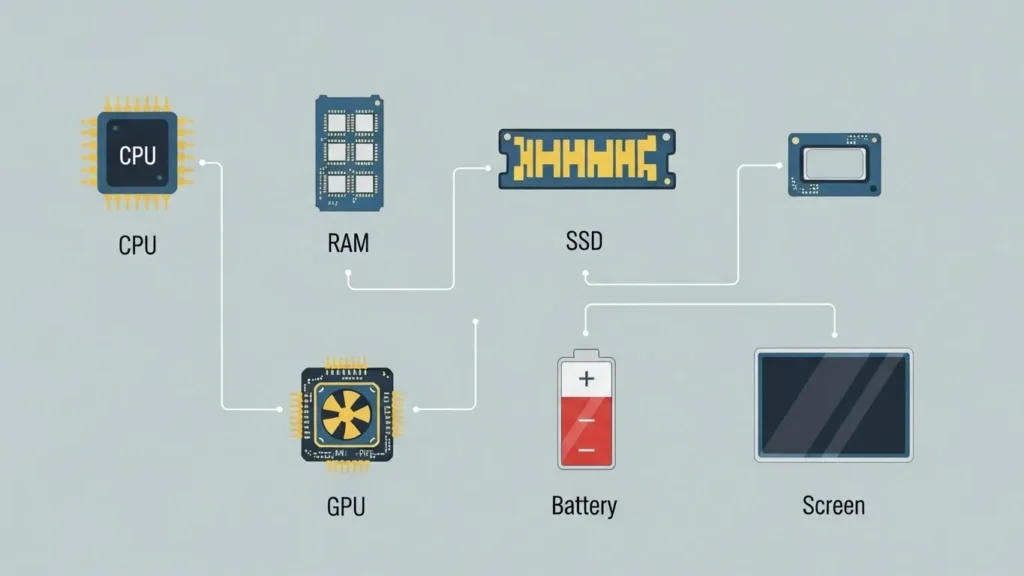
How to choose parts: CPU, RAM, Storage, GPU, Screen, Battery
CPU (Processor)
- Basic tasks / school: Intel Core i3 or AMD Ryzen 3 will handle emails, browsing and documents.
- Everyday Multitaskers: Intel Core i5 or AMD Ryzen 5 are reliable and fast for several apps at once.
- Power users & creators: Intel Core i7/i9, AMD Ryzen 7/9 or Apple M-series give speed for editing and rendering.
- Gaming: combine a strong CPU with a good GPU for playable frame rates.
Example: Editing a batch of photos while streaming needs at least a Core i5 / Ryzen 5 or better.
RAM (Memory)
- 8 GB: basic browsing and office apps.
- 16 GB: comfortable for most people; recommended today.
- 32 GB+: for large projects, heavy editing and professional tasks.
Tip: If the RAM is upgradeable, you can save now and add more later.
Storage (SSD)
- Prefer SSD NVMe for faster boot and load times.
- 256 GB = minimum for simple users; 512 GB = good balance; 1 TB for gamers and media collection.
Reason: SSDs are faster than old HDDs, so your system feels snappier.
GPU (Graphics)
- Integrated GPU (Intel / AMD / Apple) is fine for office, streaming and casual media.
- Dedicated GPU (NVIDIA GeForce or AMD Radeon) is needed for modern gaming and GPU-accelerated editing.
Example: For good 1080p gaming, an RTX 4050 or RTX 4060 laptop GPU is a sensible target.
Screen
- Size: 14’’ for portability, 15.6’’ for comfort and productivity.
- Resolution: Full HD (1920×1080) baseline; creators may want OLED or higher color accuracy.
- Refresh rate: 120–144 Hz for smoother gaming.
Battery & Charge
- Aim for 8+ hours real world battery life if you need on-the-go reliability.
- Fast charging is useful to top up during a short break.
Recommendations by user profile (Table + examples)
This table gives simple and direct model types to look for. On Black Friday, match these specs to live offers.
| Profile | Budget | Minimum spec to aim for | Example model types |
|---|---|---|---|
| Student / Mobility | 400–800 € | Ryzen 5 / Core i3-i5, 8–16 GB, 256–512 GB SSD, 14″ | Asus VivoBook, Samsung Galaxy Book |
| Home office / Productivity | 700–1200 € | Core i5 / Ryzen 5, 16 GB, 512 GB SSD, 14–15″ | Dell Inspiron, Lenovo ThinkBook |
| Creative Work | 1100 €+ | Core i7 / Ryzen 7, 32 GB, 1 TB SSD, GPU or Apple M-series | MacBook Pro M-series, ASUS ProArt |
| Gaming | 900 €+ | Core i7 / Ryzen 7, 16–32 GB, 1 TB SSD, RTX 4050+ | ASUS ROG, MSI Gaming |
Where to buy in France & Europe (Trusted retailers & tips)
Buy from retailers that give good support and clear return policies.
Top retailers
- FNAC — good for pickup and returns, trusted in France.
- Boulanger / Darty — local service and shop pickup.
- Materiel.net / LDLC — specialist tech stores for gamers & components.
- Amazon / CDiscount — wide selection but check who the seller is.
- Brand shops — Dell, ASUS, HP and Samsung sometimes run brand-only discounts.
Retailer tips
- If an Amazon listing is by a third-party seller, read seller ratings and return rules.
- Prefer sellers with clear EU warranty and customer service.
- Check local availability and in-store pickup to avoid shipping delays.
How to verify a real deal
Here is a practical walk-through you can use before clicking “Buy”.
1: Check price history
Use Keepa for Amazon, or Idealo / PriceRunner for European shops. Look back 30–90 days. If the price suddenly dropped to a number far below recent lows, be cautious.
2: Compare multiple stores
Open at least three reputable retailers and compare the final price with VAT and shipping included. If only one small seller has a huge discount, it may be risky.
3: Check the exact model code
Look for the full model code (e.g., UX550GD-BQ116T). Specs like RAM, SSD, and GPU must match across listings.
4: Read return & warranty
Confirm at least a 14-day return policy and a 2-year warranty for EU buyers. Note if the listing is for refurbished stock.
5: Save proof
Take screenshots of the page, price and seller name with date/time. Keep your confirmation emails and invoices after purchase.
Common traps and how to avoid them (Pros & Cons)
Pros of buying on Black Friday
- Significant savings on mid and high range models.
- Wide selection and more retailer competition.
- Extras (software or accessories) sometimes thrown in.
Cons and traps
- Fake discounts: inflated “before” prices.
- Hidden reconditioning: refurbished units listed as new.
- Soldered parts: RAM or storage that you cannot upgrade later.
- Seller risk: small sellers with poor after-sales service.
Avoidance strategy: rely on trusted retailers, check history, and verify full specs.

Head-to-head comparison table (Example models & features)
| Model | Best for | CPU | RAM | Storage | GPU | BF price (example) |
| MacBook Air (M4) | Light creator | Apple M4 | 16 GB | 512 GB | Integrated | ~899 € |
| Samsung Galaxy Book5 | All round | Intel Core Ultra | 16 GB | 512 GB | Integrated | 999–1299 € |
| Asus Vivobook S15 OLED | Student / media | Ryzen / Intel | 16 GB | 512 GB | Integrated | ~629 € |
| MSI Gaming (example) | Gamer | i7 / Ryzen 7 | 16–32 GB | 1 TB | RTX 40xx | Deals on FNAC/Materiel.net |
Travel & in-store experience
If you prefer to try hardware before buying:
- Visit stores in big cities (Paris, Lyon, Milan, Berlin) — test the keyboard, screen, and weight.
- Ask staff about in-store offers; some deals are store-only.
- In-Store Pickup Can Speed delivery and avoid shipping issues.
Pro tip: Try the keyboard and screen for 10–15 minutes to check comfort and color.
Fashion & lifestyle — laptops as style pieces
- Finishes: metal chassis vs plastic; color options (silver, grey, blue).
- Form factor: slim ultrabooks look premium; gaming laptops show off RGB lights.
- Influencers often create a mood with laptop shots and minimalist backpacks—this is useful for social branding.
Creators benefit from OLED screens and good color reproduction to showcase photos and video.
When shopping becomes culture: events around Black Friday
Black Friday in Europe often becomes small community events:
- Pop-up showrooms and demos near major stores.
- Local meetups where people share deals and test gear.
- Cafés and markets near tech stores turn shopping into a day out.
It’s a social way to compare devices and ask other buyers for quick opinions.
FAQs
A1: Often yes. Many real discounts appear. Always check price history and specs before you buy.
A2: Use price trackers (Keepa, Idealo). Compare at least three stores. Check the model number and warranty. Save screenshots.
A3: Aim for 400–800 €. Get at least 8 GB RAM and 256–512 GB SSD, and a 14-inch screen.
A4: Big retailers (FNAC, Boulanger, Materiel.net) are safer for warranty and returns. Marketplaces can have good deals but check seller ratings.
A5: Contact customer service and show screenshots of the price. Keep order details and emails; most big stores help.
Pros & Cons
Pros
- Big savings on many laptop classes.
- Wide availability across budgets and uses.
- Possible extras like gifts or game bundles.
Cons
- Fake discounts and confusing bundles.
- Non-upgradable parts on some cheap models.
- Risk of poor sellers on marketplaces.
Conclusion
Black Friday is a valuable chance to buy a pc portable black friday laptop at a lower price — but success depends on preparation. Decide Your Real Needs (student, work, creative, gaming), select realistic budgets, choose 2–3 target models, and activate price alerts. Use tools that show price history, compare multiple trusted retailers, and confirm full specifications and warranty before you buy. Keep proof (screenshots and emails) in case of disputes. This guide offered clear steps, helpful tables, and a compact checklist you can use on the purchase day.